PostOmnia
Workflow Link in bio Pricing
Instagram

Social-Media-Publishing für Creator, Gründer und Teams

Überall posten. Gesteuert mit KI-Assistenten.

Ein Tool für 14 Kanäle – Telegram, WhatsApp, X, Instagram, LinkedIn, TikTok, YouTube & mehr. Inhalte planen, veröffentlichen und analysieren – allein oder im Team.

  • ✓ 14 Kanäle inkl. Telegram & WhatsApp
  • ✓ Kalender, Analytics & Team-Rollen
  • ✓ Steuerbar via Claude, ChatGPT, Codex & MCP
  • ✓ Bio Free dauerhaft kostenlos, Bezahlpläne 7 Tage testen
Kontrollierbar mit Claude ChatGPT Codex MCP
C
BriefingStrategie erfasst
G
ContentVarianten bereit
›_
FreigabeKunde entscheidet
AI SOCIAL OPS PostOmnia Human approval
Instagram
LinkedIn
YouTube
Kampagne freigegeben14 Kanäle
Für Agenturen mit 3–30 Kunden Freigabe ohne Kundenlogin EU-Hosting in Deutschland Audit-Log und kontrollierte KI

PostOmnia

Sign in

Security check * This lightweight check protects accounts without interrupting your sign-in flow.
✓ Protected form

Why PostOmnia?

Use PostOmnia when publishing needs structure, control and speed.

PostOmnia brings channels, content planning, AI assistance, team permissions and analytics into one workflow. That reduces manual switching between platforms and keeps every published post traceable.

01 One controlled workspace

Plan, draft, schedule and review posts without losing context between separate social tools.

02 AI without loss of control

Claude, ChatGPT or Codex can prepare content through approved access while owners keep permissions and publishing decisions.

03 Built for repeatable campaigns

One idea can become channel-specific variants, scheduled posts and reusable campaign material.

04 Clear for teams and agencies

Workspaces, roles, connected accounts and billing stay separated so recurring client work remains organized.

Team access Invite members instead of sending them through separate registration.

The owner or an admin invites team members by email. Members still set their own login details, but their access works inside the invited team workspace and not as an independent standalone account.

New: AI Creative Studio

From one idea to posts, visuals, carousels and client approvals.

PostOmnia can generate campaign packs, Nano-Banana-style visuals, carousel slides, reel hooks, A/B variants, trend ideas and approval links directly inside the composer.

Nano visual generation

Create or edit social visuals from a prompt and add them to the post media list.

One-click campaign builder

Generate campaign, ideas, primary post, cover visual, carousel and reel package.

Client-ready workflow

Create review links, approval comments, report recommendations and smart recycling suggestions.

New: Growth Autopilot

Plan, measure and improve campaigns instead of only publishing posts.

PostOmnia combines content gaps, personas, competitor watch, approvals, shortlinks, ROI, tasks, brand-safety and platform previews in one operating layer.

Autopilot calendar

Create review-ready drafts, find missing content angles and get best-time suggestions from existing performance data.

Measurable campaigns

Use UTM shortlinks, campaign ROI, content repository and repurposing to connect posts with real learnings.

Team control

Approval inbox, client CRM, team tasks, persona checks and brand-safety keep growth work organized before publishing.

Product tour

A visual publishing cockpit before the post goes live

Plan campaigns, preview media, let AI shape variants and keep every channel visible from one workspace.

PostOmnia Studio
Claude, Claude Code, ChatGPT and Codex exchange data with PostOmnia. PostOmnia publishes to social channels. Claude Claude Code ChatGPT Codex Instagram YouTube TikTok Telegram Facebook LinkedIn X/Twitter Pinterest Threads Bluesky PostOmnia
AI
AI
01 Channel-specific variants

One idea becomes short captions, long posts, video descriptions and platform-ready copy.

02 Visual calendar rhythm

Visitors immediately understand that PostOmnia is built for campaigns, not one-off posting.

03 AI with approval

Claude, ChatGPT or Codex can prepare work, while the account owner keeps control.

Visual workspace

Real workspaces and ready-to-use post visuals

App screenshots and free demo imagery show the Composer, calendar, analytics and finished campaign posts.

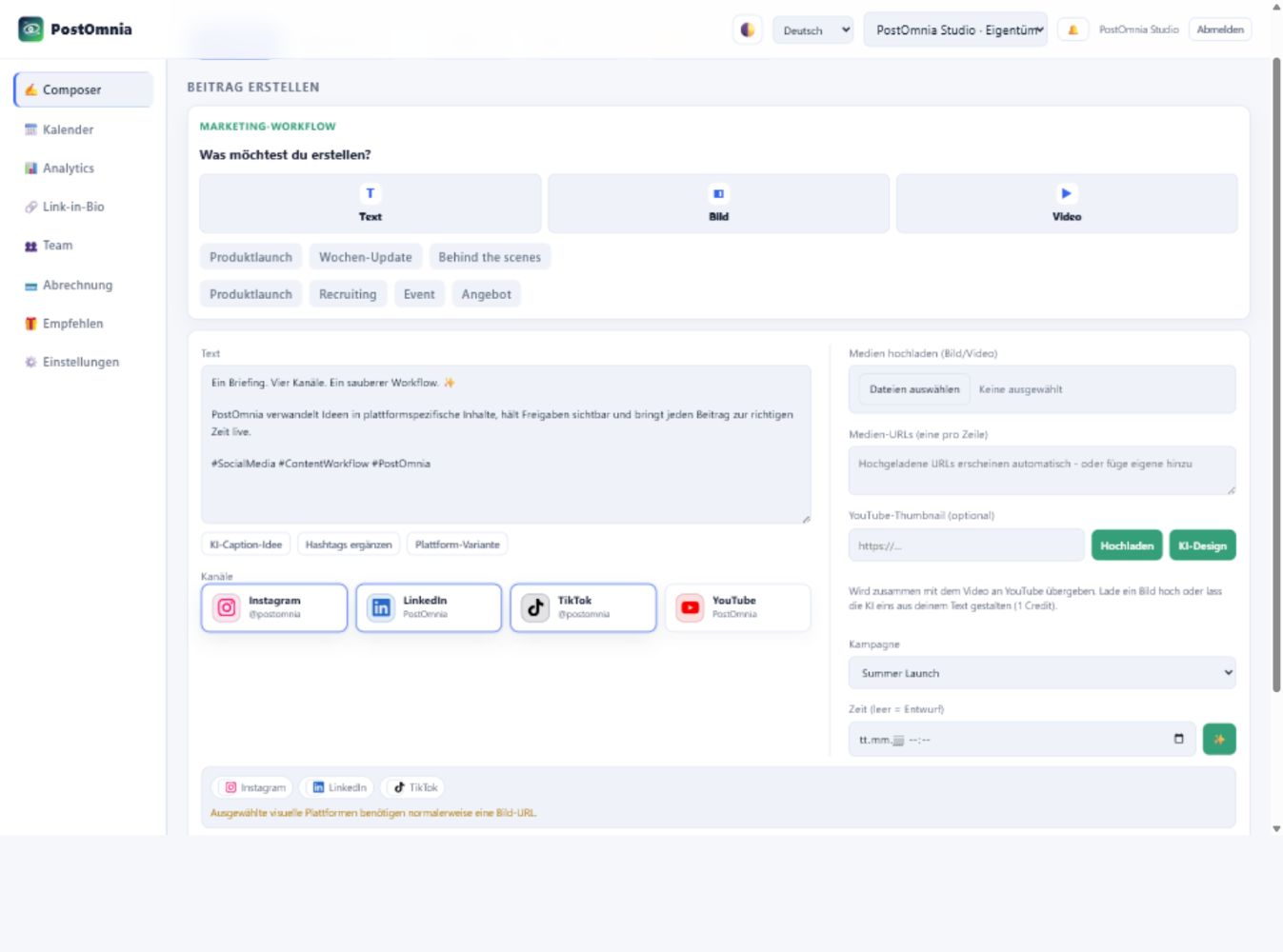
Current PostOmnia Composer with four selected channels and campaign controls
Composer workspace Connected channels, AI helpers, media upload and post controls in one broad workspace.
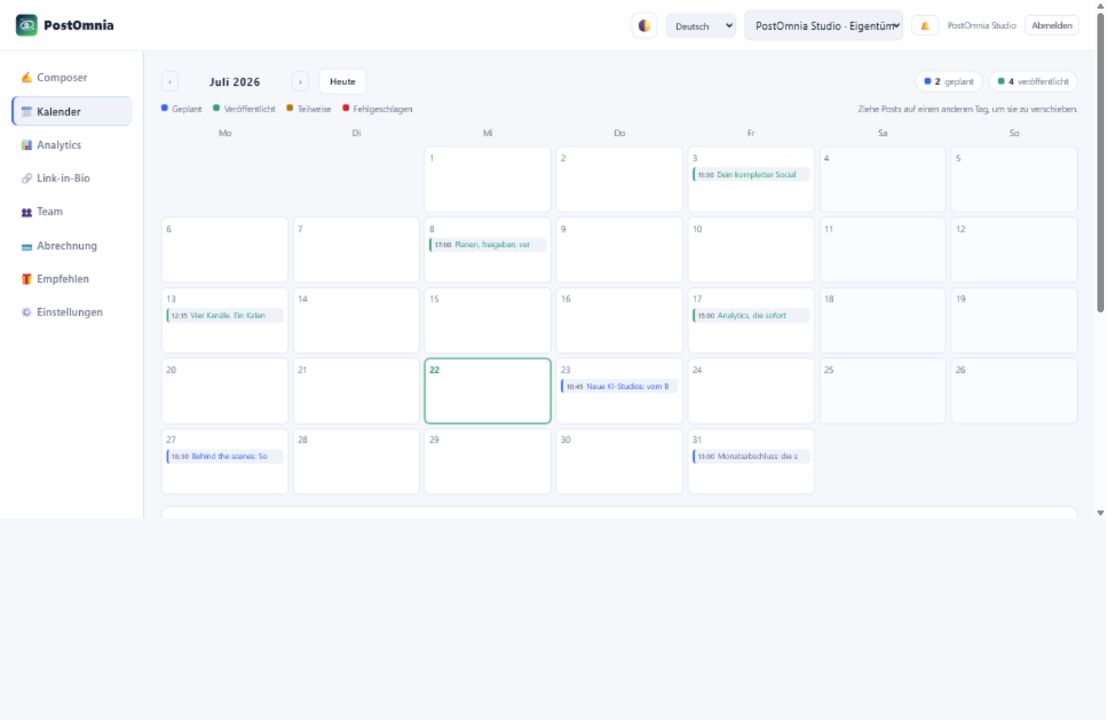
Current PostOmnia content calendar with scheduled and published campaign posts
Calendar rhythm Scheduled campaigns stay visible across channels, dates and publishing states.
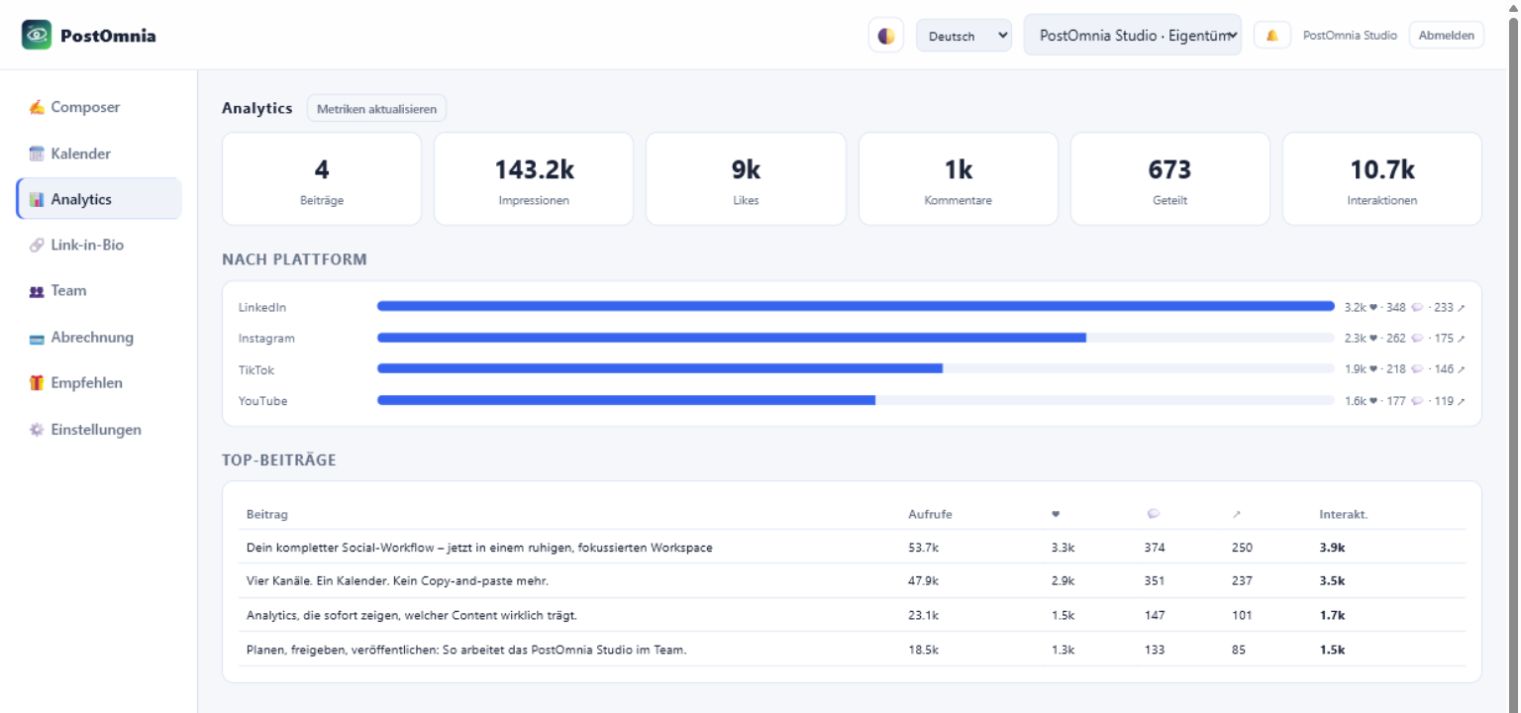
Current PostOmnia analytics dashboard with channel and post performance
Analytics view Published posts and channel signals become readable without leaving the dashboard.
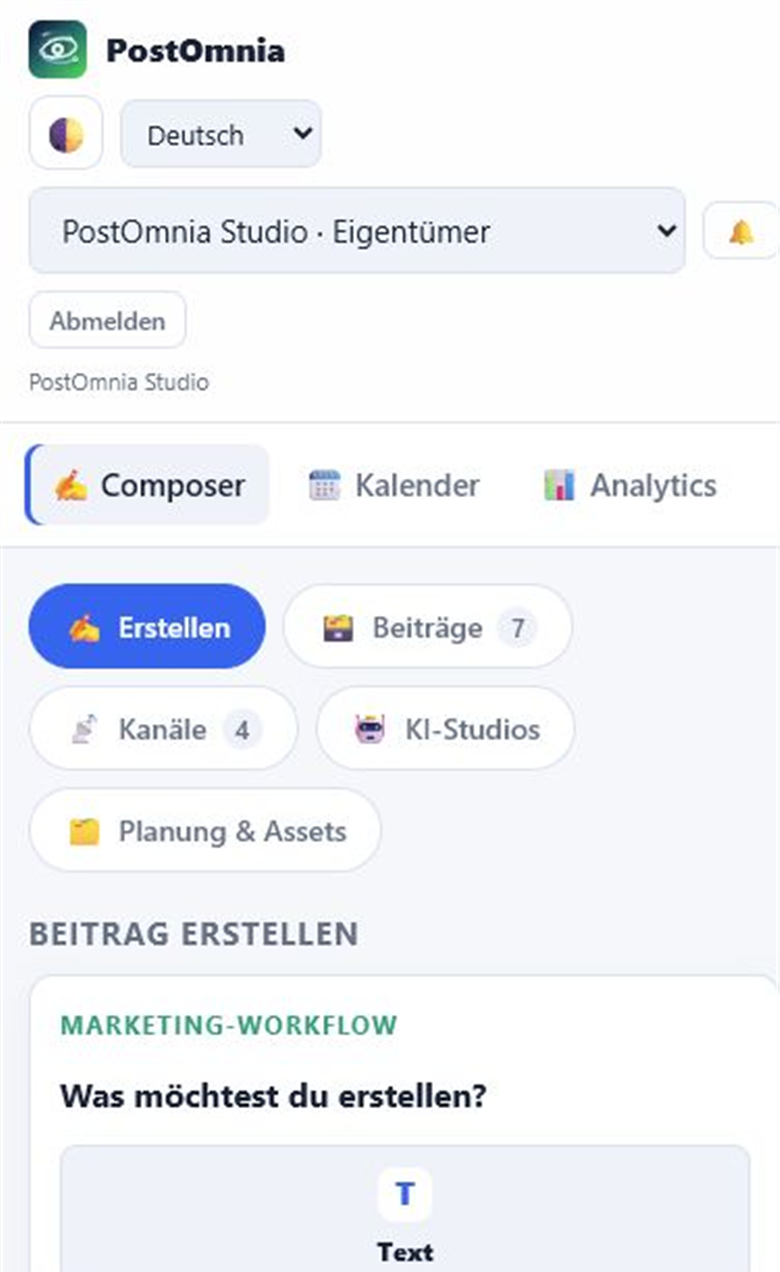
Current PostOmnia mobile Composer navigation and creation workflow
Mobile composer The same planning flow remains usable on narrow screens.
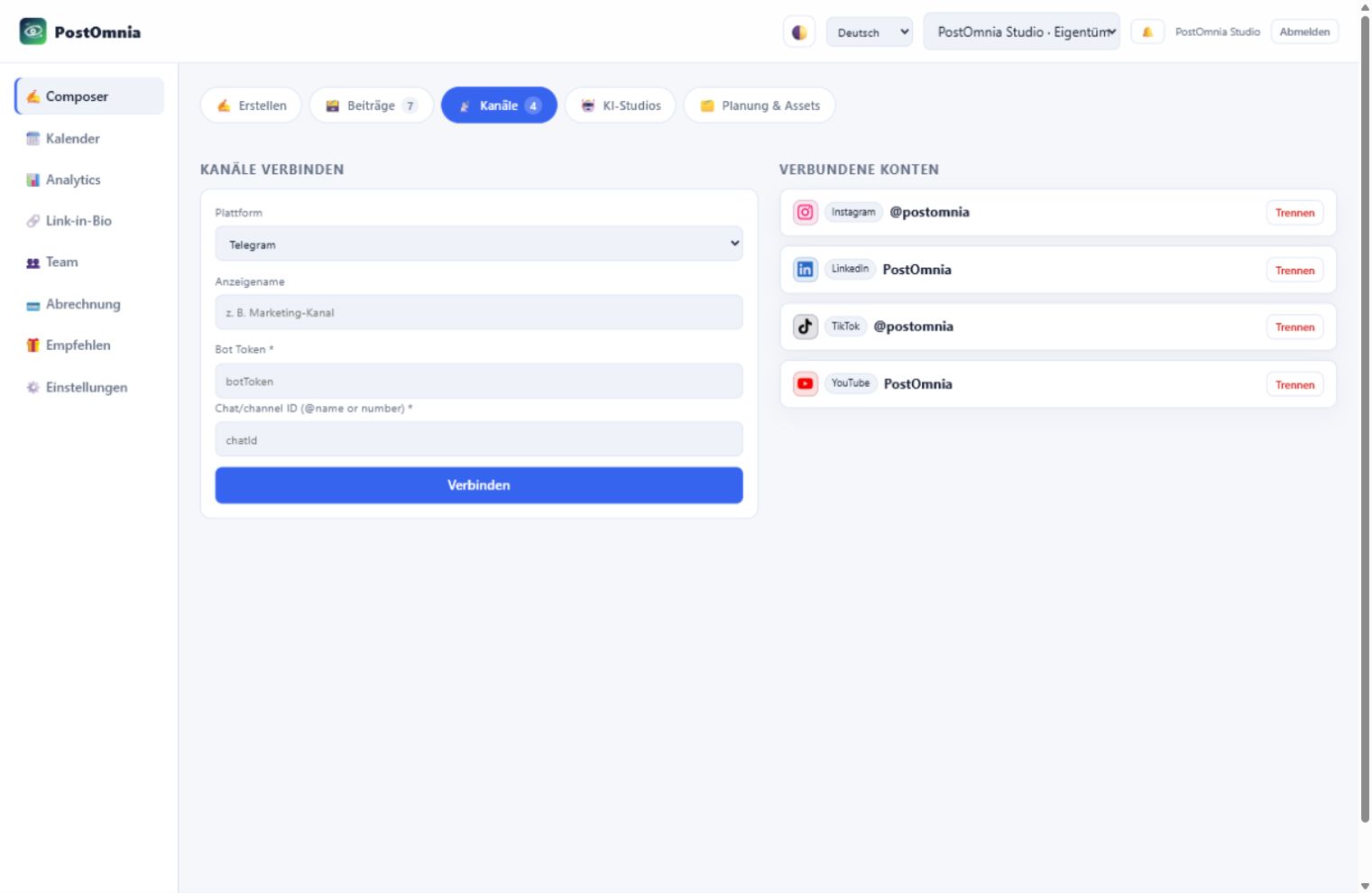
Current PostOmnia channel connection screen with connected social accounts
Connected channels Connect new platforms and keep every active social account visible in one place.
Launch post
Team update
Product story
Collaboration
Ready demo posts Freely usable stock photos are prepared as finished campaign material, separate from account images.

Workflow

Vom Kundenbriefing zum belegbaren Ergebnis

Der gesamte Agenturprozess bleibt in einem kontrollierten Workflow – mit klaren Übergaben und ohne verstreute Freigaben.

01

Kunde und Brand Voice

Kundenprofil, Zielgruppe, Tonalität und verbotene Begriffe einmal sauber hinterlegen.

02

Briefing eingeben

Kampagnenziel, Angebot und CTA werden zur gemeinsamen Quelle für alle Inhalte.

03

Varianten erstellen

KI bereitet kanaloptimierte Texte, Visuals, Carousels und Kampagnenbausteine vor.

04

Kunde gibt frei

Ein sicherer Link reicht: freigeben oder Änderungen anfordern, ohne zusätzliches Konto.

05

Kontrolliert veröffentlichen

Freigegebene Inhalte werden geplant und auf Social- sowie Community-Kanäle verteilt.

06

Ergebnisse berichten

Klicks, Reichweite, Veröffentlichungsstatus und nächste Empfehlungen werden zum Kundenreport.

Link in bio

Kostenlose Kampagnenseiten, die neue Nutzer mitbringen

Erstelle für Kunden oder Kampagnen eine Bio-Seite mit QR-Code, geplanten Links, Klickstatistik und Double-opt-in. Der kostenlose Einstieg bleibt dauerhaft nutzbar.

01

Multiple pages as tabs

One page per channel or campaign – switch between them like browser tabs.

02

Live preview while you type

A phone mockup shows every change instantly – before you even save.

03

QR code included

Every page gets a printable QR code – for packaging, posters and stories.

04

Scheduled links & drops

Links appear and disappear on schedule – perfect for launches and promos.

05

See what actually gets clicked

Every link counts its clicks – no extra analytics tool.

06

On your own domain

links.yourbrand.com instead of someone else's brand. From the Pro plan.

See a live example → Dauerhaft kostenlos · 1 Seite · PostOmnia-Branding
PostOmnia So sieht deine Link-in-Bio-Seite mit PostOmnia aus – eigene Farben, Drops, QR-Code und Klick-Statistik inklusive. 🚀 PostOmnia entdecken🔗 So funktioniert Link in Bio📸 Instagram💳 Preise & Pläne PostOmnia
+128 clicks today
Scan me

Use cases

Für Agenturen, die zwischen 3 und 30 Kunden skalieren

PostOmnia konzentriert sich auf wiederkehrende Kundenarbeit, nachvollziehbare Freigaben und messbare Ergebnisse.

01 Social-Media-Freelancer

Mehrere Kunden sauber betreuen, ohne Kalender, Chats, Freigaben und Reports manuell zusammenzuführen.

02 Boutique-Agenturen

Briefing, Produktion und Kundenfreigabe als wiederholbaren Prozess für das gesamte Team etablieren.

03 Wachsende Agenturen

Kunden-Workspaces, Rollen, Automationen und Reports skalieren, ohne die Kontrolle abzugeben.

YouTubeLong-form video planned
InstagramCaption rewritten
LinkedInLaunch post queued
TikTokShort video ready
TelegramCommunity update
FacebookAudience variant
ThreadsDiscussion starter
XShort hook ready
PinterestVisual post saved
RedditCommunity update
DiscordAudience variant
MastodonDiscussion starter
BlueskyShort hook ready
WhatsAppCommunity update
YouTubeLong-form video planned
InstagramCaption rewritten
LinkedInLaunch post queued
TikTokShort video ready
TelegramCommunity update
FacebookAudience variant
ThreadsDiscussion starter
XShort hook ready
PinterestVisual post saved
RedditCommunity update
DiscordAudience variant
MastodonDiscussion starter
BlueskyShort hook ready
WhatsAppCommunity update

Analytics

See what happens after publishing

The marketing story continues after the post: compare channels, spot strong formats and reuse what performs.

YouTube Instagram TikTok LinkedIn Telegram
Best channelLinkedIn is carrying the launch post.
AI suggestionTurn the strongest post into a short video variant.
Next actionSchedule a follow-up while engagement is rising.

Claude, ChatGPT & Codex

Connect AI assistants to PostOmnia

PostOmnia exposes a secure MCP/REST interface so supported assistants can work with your connected channels after you approve access.

Use the PostOmnia endpointEnter https://postomnia.de/api as the connector or MCP server URL.
Authenticate with PostOmniaSign in, approve the connection and return to Claude or ChatGPT automatically.
Work through approved toolsThe assistant can only use the PostOmnia actions exposed by your account permissions.
ClaudeMCP
ChatGPTOpenAPI
CodexAPI
TeamsRoles

Social platforms

Connect every channel under the PostOmnia brand

For users, OAuth channels follow the normal platform login flow. They see PostOmnia, approve access and return with the channel connected.

TelegramYouTubeInstagramFacebookThreadsLinkedInXTikTokPinterestRedditDiscordMastodonBlueskyWhatsApp

Social proof

Built around the moments where marketing usually slows down

The homepage now shows the product promise more clearly: less tool switching, more repeatable publishing, stronger campaigns.

★★★★★

“I can brief an assistant once and still decide exactly what goes live.”

Founder workflow
★★★★★

“The useful part is seeing channels, media and approvals in one place.”

Content team workflow
★★★★★

“Credits make AI usage understandable without hiding the real posting limits.”

Agency workflow

Built for serious use

Teams, account isolation, API keys, two-factor admin access, privacy controls and clear channel permissions are part of the product foundation.

Team roles Admin controls OAuth consent Data export

Simple setup

From first login to your publishing cockpit

A short, visible path makes the product easier to understand before registration.

01 Start the trial

Create your account and choose the plan you want to test.

02 Connect channels

Add social accounts through the normal platform consent flow.

03 Invite AI safely

Use MCP, REST or the dashboard while account permissions stay in control.

04 Publish and learn

Schedule posts, compare results and repeat what works.

Simple pricing

Pricing

Mit einer kostenlosen Bio-Seite starten und auf den vollständigen Agentur-Workflow wechseln, sobald Publishing und Kundenarbeit dazukommen.

Bio Free bleibt kostenlosEine gebrandete Seite mit QR-Code, Klickstatistik, geplanten Links und Lead-Erfassung.
Pro is the growth planMore channels, team access, analytics and a practical AI credit budget.
Agency scales client workHigher limits, priority support and room for recurring client campaigns.

Cancel anytime · Annual billing saves 17% · AI credits included.

FAQ

Answers before you start

What makes PostOmnia different?

PostOmnia is built around AI-controllable publishing: assistants can prepare and operate approved workflows through MCP and REST.

Can teams approve work before publishing?

Yes. Team roles, channel permissions and scheduled drafts keep the owner in control before content goes live.

Do team members need to create their own account?

No. Team owners or admins invite members by email. Invited members still set login details, but their access works in the context of the invited team workspace and is not a separately created standalone account.

Which channels are supported?

PostOmnia supports 14 channels including Telegram, WhatsApp, X, Instagram, LinkedIn, TikTok, YouTube and more.

Do I need payment details to understand the workflow?

Every paid plan starts with a 7-day trial so you can connect channels, create posts and test the workflow first.

Can PostOmnia publish automatically?

Yes. Posts can be saved as drafts, scheduled for later or published immediately, depending on your permissions and connected channel.

How does the AI connection stay controlled?

AI assistants only work through approved MCP or REST access. Tokens, roles and team ownership keep the account owner in control.

Can I manage several brands or workspaces?

Yes. Workspaces separate channels, posts, members, billing and API access so agencies and teams can keep clients cleanly separated.

Are analytics available for every network?

Analytics appear when a platform exposes reliable metrics through its API. Channels without metrics still remain usable for planning and publishing.

What happens if a post fails?

The dashboard shows failed or partially published posts, so teams can review the channel result and retry or adjust the content.

Is PostOmnia suitable for agencies?

Yes. The Agency plan adds higher limits, more members, more workspaces, API access and priority support for recurring publishing work.

Still unsure?

Ask a question

The assistant checks your question against curated product answers and shows the safest matching response.

Try asking about channels, AI access, approvals, billing, analytics or agencies.

Product tour

Euren ersten Kunden-Workflow gemeinsam aufsetzen

Vom Briefing über die Freigabe bis zum Report – direkt mit dem passenden Tarif starten.

Product

  • Features
  • Link in bio
  • Pricing
  • AI connections
  • Content calendar
  • Analytics

Platform

  • Dashboard
  • Teams
  • Billing
  • Security

Resources

  • Help
  • Documentation
  • API reference
  • Changelog

Legal

  • Legal Notice
  • Privacy
  • Terms
  • Security
Instagram
Give feedback · Cookie settings
© Fade Media GmbH — PostOmnia
PostOmnia
Notification center
📧 Please confirm your email address to fully activate your account. No email? Check your spam folder and mark it as “Not spam” so the confirmation link works.
💳 Your plan is not active yet – complete the payment to unlock publishing.
How is PostOmnia working for you? A short rating helps us improve.
Protect your account: enable two-factor authentication in security settings.

Connect channels

Connected accounts

Growth Autopilot

Plan, measure, approve and optimize content with one operating panel.

30 tools
AI Creative Studio

Create visuals, campaigns, carousels, reel ideas and client approval packages from one prompt.

AI
Campaigns & ideas
Import & recycling
Post templates
Media library

Posts

Review, filter and sort all drafts, scheduled and published posts.

Post actions explained
RecycleSchedule a fresh copy at the next best time – reworded by AI if configured.
EvergreenAutomatically schedules a fresh copy after the shown interval; click again to switch it off.
VariantsCreate labeled language versions attached to the post; the text is not translated automatically.
CommentAdd an internal note to the post so your team can coordinate its review.

Create post

Marketing workflow What would you like to create?
Channels

Sent to YouTube together with the video. Upload an image or let AI design one from your post text (1 credit).

Scheduled Published Partial Failed Drag posts onto another day to reschedule them.

Show in Apple or Google Calendar

Subscribe once with this private link – scheduled and published posts then appear automatically in your calendar app and stay in sync.

Open in Apple Calendar

Google Calendar: Settings → Add calendar → From URL → paste the link. Outlook works the same way.

The old link stops working immediately.

Analytics

Teams

Members (active team)

Team members do not register separately. They receive an invitation, set their login details and use PostOmnia in the context of this team workspace.

Without a mail server, the invitation link appears in the server log (dev mode).

Pending invitations

Link in bio

One public page that bundles your links.

Page

Letters, numbers and hyphens.

Colours the whole page behind the links. Text, cards and borders adapt to it automatically.

Outgoing clicks get utm_source=postomnia-bio – so the destination's analytics show where visitors came from.

Open page QR code Poster

Live preview

Updates while you type – before saving.

Links

Social icons

Profile links shown as round icons under your bio – the platform is detected automatically.

Email signups

A signup form on your public page. Subscribers confirm via email (double opt-in) – export anytime as CSV.

Own domain

Point a CNAME of this domain to: postomnia.de

Current plan

Billing details

Used on your invoices. Required when you subscribe to a paid plan. Fields marked with * are required.

Plans

Invoices

Your profile

Update your account details. Changing your email requires re-verification.

Workspace settings

Your active workspace controls channels, posts, billing, members and API access.

Notifications

Get browser notifications when posts are published or fail.

Brand voice

Used by AI actions to keep team posts consistent.

Workspace status

Reports & backups

Connected AI assistants

Assistants like Claude, ChatGPT or Codex that you authorized via PostOmnia sign-in. Disconnecting immediately revokes their access.

API key (for MCP / ChatGPT)

MCP servers (Claude) and ChatGPT actions use this key as x-api-key. It is tied to your account and works in your first team.

Endpoints

Webhooks

Security settings

Two-factor authentication

Use an authenticator app to protect sign-ins with a second factor.

Please confirm your password to start the setup.

Scan the QR code with your authenticator app (e.g. Google Authenticator, 1Password), then enter the current 6-digit code. You can also add the setup key manually.

To set up a new authenticator, confirm your password and enter a current authenticator code or one of your recovery codes. Your current 2FA stays active until the new one is confirmed.

To disable, confirm your password and enter a current authenticator code or one of your recovery codes.

Privacy (GDPR)

Export your data or delete your team/account irreversibly.

You can change this at any time. Analytics helps us understand clicks, pages and activation steps without storing form contents.

Export the active workspace with posts, media metadata, templates and audit log.

Recommend PostOmnia – earn AI credits

Share your personal link. Your friends get extra trial days, you get AI credits for every confirmed signup.

Your referral link

How it works

  1. Share your link – via WhatsApp, social media or email.
  2. Your friends sign up through it and get extra trial days automatically.
  3. As soon as they confirm their email, the AI credits land in your account.

Your referrals

Admin overview

Admin tasks

Platform apps & API keys

Enter the Client ID and Client Secret of your developer apps here. Values are stored encrypted and take effect immediately – no restart, no .env changes. Admin values take precedence over .env.

Integrations & services

Product tracking

Mail operations

Registered accounts

Connected accounts

Audit log

🔒

Documentation · Legal Notice · Privacy · Terms · Security · Cookie settings · Give feedback
© Fade Media GmbH — PostOmnia

How do you like PostOmnia?

Your rating goes directly to the team and helps us improve PostOmnia.

What stopped you?

A quick reason helps us improve this flow.

Wähle deinen Einstieg

1Choose plan 2Account 3Payment

Starte mit der dauerhaft kostenlosen Bio-Seite oder wähle einen Workflow-Plan mit 7 Tagen Testphase.

Feature comparison

Your billing details are used for proper invoices. The payment itself is processed securely by Stripe – we never see your card details.

You will be redirected to Stripe. Your plan is activated as soon as the payment is confirmed – the 7-day trial starts right away and you won’t be charged before it ends.